- Pagina iniziale /
- Elettronica /
- Computer Accessories /
- Computer Accessories & Peripherals /
- Input Devices /
- Touch Pads /
- Wireless Trackpad Multi-Touch Surface Bluetoo...
0 ratings






Articolo #:
220056114
Wireless Trackpad Multi-Touch Surface Bluetooth Touchpad with High Precision Navigation for Windows10/11/Desktop/Laptop/Notebook Computer PC (MG3
81% of respondents would recommend this to a friend
Articolo #:
220056114
€ 60
Price Details
Excluding Shipping & Custom charges ( Shipping and custom charges will be calculated on checkout )
*All items will import from Stati Uniti
In magazzino
 Importato dal negozio USA
QTY:
Solo 12 articoli rimasti in magazzino.
Ordina subito e indossalo Giovedì, Luglio 23
Secured transaction
Ubuy works hard to protect your security and privacy. Our advanced payment security system ensures confidentiality by encrypting your information during transmission using AES (Advanced Encryption Standards) and SSL (Secure Socket Layer) protocols. Your payment details are 100% secure as we do not share your payment details with third party sellers.
I nostri principali partner logistici


Enjoy effortless navigation with style and ease that seamlessly integrates into your workspace.

Consegna
veloce

Reso
gratuito*

Imballaggio sicuro

Prodotti originali al 100%

Conformità PCI DSS

Certificazione ISO 27001


Note: Step Down Voltage Transformer required for using electronics products of Stati Uniti store (110-120). Recommended power converters Acquista ora.


Cosa salta all'occhio
Tempered Glass Surface
The durable tempered glass surface offers a smooth and responsive experience, enhancing tactile feedback while ensuring longevity and resistance to scratches.
Multi-Touch Functionality
With advanced multi-touch support, users can navigate effortlessly through gestures, providing an intuitive user experience that boosts productivity on Windows devices.
Rechargeable Slim Design
The slim, rechargeable design not only saves desk space but also eliminates the need for disposable batteries, making it a more sustainable and eco-friendly choice.
Dettagli del prodotto
- Tempered Glass Surface -MG3 LuolaProject designs left and right touch buttons, trackpad upgraded the surface to tempered glass to be smoother, more efficient and comfortable than ever, it boasts a sturdy aluminum base and anti-slip pads on the bottom for added stability. Enjoy effortless navigation with style and ease that seamlessly integrating into your workspace(not compatible with MacOS/Linux/IOS/Andoird)
- Brand new - LuolaProject MG3 touchpad is specially designed new touch left and right buttons can perfect touch and hold with another finger to drag,With fast and sensitive responses at your fingertips, you can easily tap, scroll, pinch to zoom in on photos, and perform other functions with precision and ease. The touch surface is optimized for optimal smoothness, providing a seamless operation that surpasses typical laptop touchpads,two fingers tap once the simulate the right click of mouse
- Large-Size Trackpad with Multi-touch - LuolaProject external touchpad is designed with multi-touch controls up to 5 fingers gestures, makes it easy to select and drag, zoom in/out and scroll, activate "Cortana", switch between missions, activate mission control, minimize to desktop or activate operation center.
- Plug and Play & Stable USB-C Connection - Experience hassle-free operation with LuolaProject USB trackpad, which is designed to work right out of the box. Simply plug the USB cable into your computer's USB port, the other side USB C to the trackpad,and you're ready to go - no additional drivers necessary.If the device has exclusively has a USB-C port then you may need to use USB A-USB C adaptor, Enjoy the reliability and stability of a USB C cable connection that allows you to use the touchpad freely without any connection problems. Say goodbye to frustrating setups and hello to seamless computing
- seamless conectivity via bluetooth or 2.4g wireless – The wireless trackpad can be connected by wire, wireless 2.4g receiver and Bluetooth by toggling the switch on the side. Switch the connect button can change 2.4G/BT/USB wired connection (please note that gestures cannot be used when connecting the trackpad Bluetooth on MacOS system, and it will be recognized as a mouse by the system, so this connection method is not recommended for MacOS system);
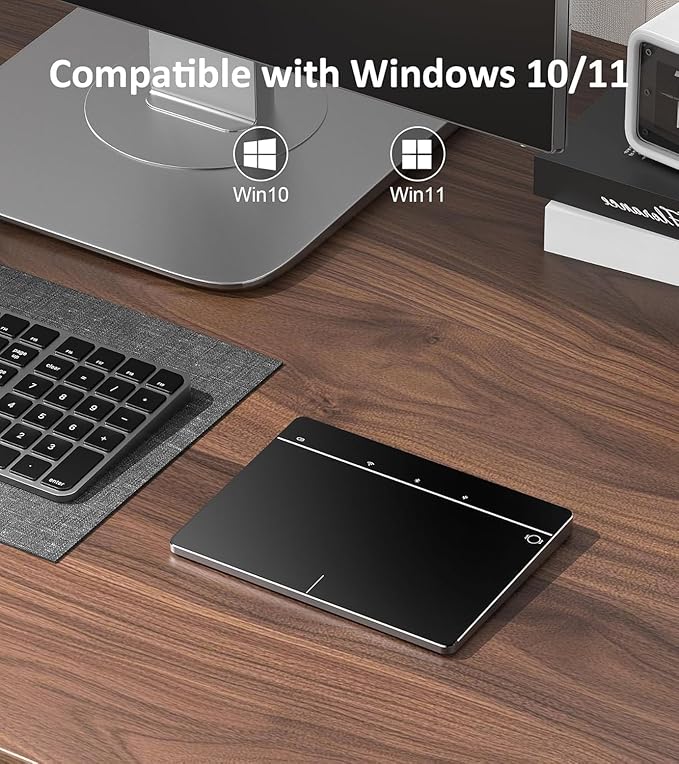
- Wide Compatibility - LuolaProject computer touchpad is compatible with Windows10/11/IpadOS 13 or later, making it suitable for use with most PCs, laptops, and desktop computers. It supports Windows Touch Gestures setting like gesture control, as well as customizing cursor speed and scrolling direction. Stay on top of your computing with the support and compatibility you need!(Not compatible with Mac, Chrome OS, or Linux)
| Tecnologia di connettività | Bluetooth, USB, Wired |
| Características Adicionales | Inalámbrico |
| Movement Detection | Optical |
| Hand Orientation | left and right hand |
| Dispositivos compatibles | Personal Computer, laptop and desktop |
| Operating System | Windows10/11 |
| Numero di batterie | 1 9V batteries required. (included) |
| Hardware Platform | Laptop/Desktop, PC |
| Mouse Maximum Sensitivity | 1200 Dots per Inch (3048 cm) |
| Color | MG3 Black |
| Tema | Science |
| Peso del artículo | 135 Grams |
| Dimensioni articolo L x L | 6.34"L x 4.6"W (16.1 cm) |
| Marca | LuolaProject |
| Nombre del modelo | MG3 |
| Antenna Location | Oficina |
| Número de modelo | 179ef0ab-07f9-4744-8840-0e1cd329a8ed |
| Are Batteries Included | si |
| ¿Se requieren baterías? | si |
| Fabricante | LuolaProject |
| Material de la carcasa | Plastic Bottom, Tempered Glass Surface |
| Besondere Funktion | Inalámbrico |
| Movement Detection Technology | Optical |
A chi è consigliato?

-
Diseñadores gráficos
Offers high precision navigation and multi-touch gestures, essential for creative design applications and finer control.
-
Tecnología Entusiastas
Ideal for users who appreciate modern devices and enjoy using wireless, sleek technology for improved desktop experience.
-
Minimalist Benutzer
Perfect for those seeking a clutter-free workspace as its slim design complements minimalistic setups without sacrificing functionality.

-
Jugadores apasionados
May lack the necessary precision and quick response times required for high-level gaming performance compared to traditional mice.
-
Mobile Professionals
Not portable enough for frequent travelers who prefer compact devices, as it is designed primarily for stationary use.
-
Compradores con presupuesto
Could be considered overpriced by users looking for basic functionality without the added features of trackpads in this range.
DESCRIZIONE DEL PRODOTTO
Hai qualche domanda? chatta con noi
Domande e risposte dei clienti
-
domanda:
What devices are compatible with the Wireless Trackpad?
Rispondere: The Wireless Trackpad is primarily designed to be compatible with Windows 8 and 10 devices. Its USB interface allows for easy connection, ensuring that laptops and desktops that run these Windows versions can interface seamlessly. Furthermore, as it utilizes a standard driver, it can work well with many third-party applications and software designed for Windows interfaces. For instance, if you're using a Windows laptop for graphic design, the trackpad's high precision can enhance your workflow significantly. -
domanda:
How do I charge the Wireless Trackpad?
Rispondere: Charging the Wireless Trackpad is straightforward, as it comes with a rechargeable battery that connects via a USB cable. Simply plug it into a USB port on your computer or a compatible charger. Typically, a full charge can provide several hours of wireless use, making it perfect for extended productivity sessions. For example, if you're working late at the office, a quick charge can get you back to using the trackpad in no time. -
domanda:
Does the Wireless Trackpad support multi-touch gestures?
Rispondere: Yes, the Wireless Trackpad supports multi-touch gestures, allowing for a more intuitive and efficient navigation experience. Users can perform actions such as pinch-to-zoom, swipe for scrolling, and tap-to-click with ease. This feature is particularly beneficial for those who prefer a touch-centric workflow, like graphic designers or anyone who regularly manipulates images or documents on their devices. Utilizing these gestures can significantly enhance user experience. -
domanda:
Is the surface of the Wireless Trackpad resistant to scratches?
Rispondere: Yes, the Wireless Trackpad features a tempered glass surface that is designed to be resistant to scratches and wear. This ensures that the trackpad remains smooth and functional over time, even with frequent use. Whether you're working in a busy office or at home, this durability can provide peace of mind, especially for users who value aesthetics and functionality equally in their devices. -
domanda:
What is the response time of the Wireless Trackpad?
Rispondere: The Wireless Trackpad is engineered for high precision, featuring a fast response time that minimizes lag during use. This is vital for tasks that require accuracy, such as gaming or graphic design. Users can expect seamless navigation and interaction, making it an optimal choice for multi-tasking environments. Whether you're switching between applications or editing high-resolution images, the responsive performance won't hinder your productivity. -
domanda:
Can I use the Wireless Trackpad for gaming?
Rispondere: While the Wireless Trackpad is not specifically designed for gaming, its high precision navigation can still make it suitable for casual gaming experiences. For instance, games that rely on strategy or precision can benefit from the accurate control the trackpad provides. However, for more intense gaming sessions, a traditional mouse may offer advantages such as faster response and dedicated buttons. -
domanda:
How portable is the Wireless Trackpad?
Rispondere: The Wireless Trackpad is designed to be slim and lightweight, making it highly portable. It can easily fit into a laptop bag or be carried around without adding significant bulk. This portability is ideal for individuals who travel frequently for work or school. For example, if you're a student moving between classes, this trackpad can provide a great touch interface without the hassle of dealing with cords. -
domanda:
What are the key features of the Wireless Trackpad?
Rispondere: Key features of the Wireless Trackpad include a slim design, tempered glass surface, multi-touch functionality, and high precision navigation. Its rechargeable battery adds convenience, eliminating the need for constant replacement. These features make it suitable for both professional and casual use, catering to users who require efficiency and style in their tech accessories. Whether in creative industries or business settings, these specifications support productivity. -
domanda:
How does the Wireless Trackpad compare to a traditional mouse?
Rispondere: The Wireless Trackpad offers a different user experience compared to a traditional mouse. While a mouse provides precise control for tasks like gaming or graphic design, the trackpad allows for seamless multi-touch gestures and a more fluid navigation experience. This can be advantageous in creative scenarios where gesture support is beneficial. For users who multitask frequently, the trackpad's gestures can enhance workflow efficiency. -
domanda:
Where can I buy the Wireless Trackpad?
Rispondere: You can purchase the Wireless Trackpad from Ubuy, San Marino's online marketplace renowned for its wide selection of tech gadgets. Ubuy offers convenient delivery options and a user-friendly shopping experience, making it your go-to platform for acquiring quality electronic devices like this wireless trackpad.
LuolaProject Touch Pads Editorial Review


Nessuna recensione editoriale trovata
Recensioni e valutazioni del cliente
16 valutazioni dei clienti
-
5 stella
46%
-
4 stella
21%
-
3 stella
14%
-
2 stella
8%
-
1 stella
11%
Recensisci questo prodotto
Condividi le tue impressioni con altri clienti
Platform Trust & Buyer Confidence

MT
Mohd
Verified buyer
“The product received very good packaging & safe…Thank You”
16 June 2026 · via Trustpilot
SJ
Shawati
Verified buyer
“Accurate delivery timing given”
16 June 2026 · via Trustpilot
YB
Youcef
Verified buyer
“Not madly expensive like I thought, and much quicker than promised.”
15 June 2026 · via Trustpilot
LM
Leila
Verified buyer
“Never dealt with Ubuy before, but everything worked out great. Seamless cross border purchasing and shipping. Thanks!”
6/7/2026 · via Trustpilot
KA
Kwame
Verified buyer
“The process was smooth, with clear communication and timelines. This was my 1st purchase and I am really impressed. I will definitely be coming back.”
12 June 2026 · via Trustpilot
Pagamento sicuro
Global Delivery
Easy Returns
Genuine Products
Categorías Relacionadas
Cronologia dei prezzi del prodotto
Informazioni importanti
- Limitazioni: per i prodotti spediti a livello internazionale, si prega di notare che ogni garanzia del produttore potrebbe non essere valida, le opzioni di assistenza del produttore potrebbero non essere disponibili, i manuali del prodotto, le istruzioni e gli avvisi di sicurezza potrebbero non essere nella lingua del paese di destinazione. I prodotti (e i materiali di accompagnamento) potrebbero non essere progettati in conformità con gli standard, le specifiche e i requisiti di etichettatura del paese di destinazione e i prodotti potrebbero non essere conformi alla tensione di rete del paese di destinazione e ad altri standard elettrici (richiedendo l'uso di un adattatore o di un trasformatore, se necessario). Il destinatario è responsabile di assicurare che il prodotto possa essere legalmente importato nel paese di destinazione. Quando si ordina da Ubuy o dai suoi affiliati, il destinatario è l'importatore registrato ed è tenuto a rispettare tutte le leggi e i regolamenti del paese di destinazione.
- Non tutti i prodotti elencati su Ubuy sono in vendita, poiché Ubuy è un motore di ricerca globale. I prodotti sono soggetti a regolamenti di esportazione/commercio.
€ 60
Ordina subito e indossalo Giovedì, Luglio 23
Questo articolo non è vietato nel mio paese. (Fai clic sul link se questo articolo non è vietato nel tuo paese. In questo modo, il nostro team verificherà il permesso).
QTY:
Solo 12 articoli rimasti in magazzino.
Secured transaction
PCI DSS compliant and ISO 27001:2022 certified, with encrypted payments and full buyer protection on every order.
I nostri principali partner logistici
Consegna transfrontaliera più veloce
Caratteristiche e benefici
- Tempered glass surface ensures smooth and comfortable navigation.
- No physical buttons design allows for perfect text selection and file dragging.
- Full-size trackpad supports multi-touch controls with up to 5 finger gestures.
- Plug and play functionality with stable USB-C, Bluetooth, and 2.4g wireless connectivity.
- Wide compatibility with Windows 8, 10, and 11, supporting various touch gestures.
- Sturdy ABS base with anti-slip pads provides added stability.
Ubuy Assurance
Experience worry-free shopping with 100% original products, PCI DSS-compliant payment security, ISO 27001-certified data protection, the fastest cross-border delivery, free returns *, and secure packaging on every order.