0 ratings




Articolo #:
219460246
Mac mini M4 2TB SSD Hard Disk Upgrade DIY | SSD Upgrade for Mac mini M4, 3300MB/s High Speed, Easy Installation, Reliable Storage
88% degli intervistati lo consiglierebbe a un amico
Articolo #:
219460246
€ 483
Dettagli del prezzo
Escluse spese di spedizione e doganali ( Le spese di spedizione e doganali saranno calcolate al momento del pagamento )
*Tutti gli articoli verranno importati da Stati Uniti
Disponibile
 Importato dal negozio USA
Qtà:
Solo 5 articoli rimasti in magazzino.
Ordina subito e ricevilo entro Monday, Settembre 14
Transazione sicura
Ubuy works hard to protect your security and privacy. Our advanced payment security system ensures confidentiality by encrypting your information during transmission using AES (Advanced Encryption Standards) and SSL (Secure Socket Layer) protocols. Your payment details are 100% secure as we do not share your payment details with third party sellers.
I nostri principali partner logistici


Engineered exclusively for Mac Mini M4, this SSD quadruples your storage capacity to effortlessly house large media libraries, professional-grade applications.

Consegna
veloce

Reso
gratuito*

Imballaggio sicuro

Prodotti originali al 100%

Conformità PCI DSS

Certificazione ISO 27001



Note: Step Down Voltage Transformer required for using electronics products of Stati Uniti store (110-120). Recommended power converters Acquista ora.


Cosa salta all'occhio
Easy Installation
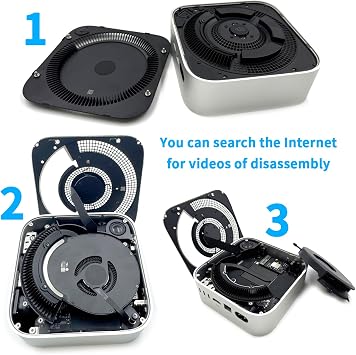
This DIY kit simplifies the hard disk upgrade process, allowing users to effortlessly enhance their Mac mini's storage without professional assistance, saving both time and money.
1TB Storage
Offering a spacious 1TB SSD, this upgrade significantly boosts file storage capacity, enabling users to store large applications, media, and files without worrying about running out of space.
High Performance
The M4 SSD enhances device performance, reducing load times and increasing data transfer speeds. Users can enjoy a more responsive system for demanding applications and multitasking.
Dettagli del prodotto
| Hardware Interface | eSATA |
| Hardware Platform | x86_64 |
| Memory Storage Capacity | 2 TB |
| Compatible Devices | Mac mini M4 |
| Supported Devices Quantity | 4 |
| Data Transfer Rate | 3300 megabits_per_second |
| Connectivity Technology | SATA |
| Color | M4-2TB |
| Enclosure Material | Aluminum |
| Item Weight | 0.02 kg |
| Brand | sbaceflay |
| Unit Count | 1 Count |
| Number of Items | 1 |
| Manufacturer | sbaceflay |
| UPC | 726899873371 |
| Built-In Media | Installation Guide |
| Model Number | M-2 |
| Mfr Part Number | M4-2TB |
| Material | Aluminum |
Cosa c'è nella confezione
Installation Guide
A chi è consigliato?

-
Tech Enthusiasts
Users who enjoy upgrading their hardware will appreciate the flexibility of a DIY SSD installation.
-
Content Creators
Photographers and video editors will benefit from increased speed and capacity for storing large files.
-
Budget-Conscious Users
Those looking to enhance their Mac mini's performance without purchasing a new model will find this upgrade viable.

-
Non-Technical Users
Individuals unfamiliar with hardware upgrades may struggle with the installation process and require professional help.
DESCRIZIONE DEL PRODOTTO
Hai qualche domanda? chatta con noi
Domande e risposte dei clienti
-
Domanda:
What is included in the Mac mini M4 SSD 1TB Hard Disk Upgrade DIY Kit?
Risposta: The Mac mini M4 SSD 1TB Hard Disk Upgrade DIY Kit typically includes a 1TB SSD, installation tools, and a detailed instruction manual. This comprehensive kit is designed to provide everything you need for a smooth upgrade process, making it perfect for tech enthusiasts and beginners alike. The included tools are specifically chosen to assist with the Mac mini's unique build, ensuring a secure installation. Whether you are looking to increase storage for demanding applications, improve system speed, or simply back up your data, this kit serves as a reliable solution. -
Domanda:
Is the installation process for the Mac mini M4 SSD 1TB difficult?
Risposta: The installation process for the Mac mini M4 SSD 1TB is manageable for those with basic technical skills. The kit comes with an instructional manual that guides users step-by-step through the upgrade. Clear visual aids and detailed instructions help demystify the process, making it accessible for most users. If you are comfortable with small electronics and have a steady hand, this DIY kit is a fantastic way to enhance your Mac mini's performance without needing professional assistance. -
Domanda:
What are the performance benefits of upgrading to a 1TB SSD?
Risposta: Upgrading to a 1TB SSD significantly enhances performance by providing faster read and write speeds compared to traditional hard drives. Users will experience quicker boot times, faster file transfers, and improved application loading. This upgrade is ideal for anyone using resource-intensive applications such as video editing software or large databases. The additional storage capacity also allows for keeping extensive libraries of photos, videos, and music without compromising speed. -
Domanda:
Can I use the Mac mini M4 SSD kit with other models?
Risposta: The Mac mini M4 SSD 1TB Hard Disk Upgrade DIY Kit is specifically designed for certain models of the Mac mini. It is crucial to check compatibility through the product specifications or your Mac's model number before purchase. If you have a compatible model, you can expect seamless installation and optimal performance. For other models, be sure to look for SSD upgrade kits tailored to their design and specifications to ensure a successful upgrade. -
Domanda:
How do I back up my data before upgrading the SSD?
Risposta: Backing up your data before upgrading to a new SSD is a crucial step to ensure that none of your important files are lost. You can utilize Time Machine, Apple's built-in backup feature, to create a complete backup of your system. Alternatively, you can manually back up files to an external drive or cloud storage. This way, you not only protect your data but also have a clean slate for the new installation, enabling you to take full advantage of your upgraded system. -
Domanda:
What tools are required for the installation?
Risposta: The installation of the Mac mini M4 SSD typically requires basic tools such as a Torx screwdriver and a prying tool, which are usually included in the DIY kit. These tools are essential for safely opening the Mac mini and accessing the internal components. Having the right tools ensures that you can complete the upgrade efficiently and without damaging the internal hardware. If you prefer, you can also find online videos demonstrating the process, which can provide additional assistance. -
Domanda:
Will upgrading to a 1TB SSD void my Mac mini's warranty?
Risposta: Upgrading your Mac mini with a DIY SSD kit can potentially void any remaining warranty depending on the terms set by Apple. However, many users perform upgrades without any issues. It's advisable to review Apple’s warranty policy or consult with Apple Support before proceeding with any hardware modifications. If you prioritize warranty, consider using Apple-certified upgrade services to retain coverage while still enhancing your machine’s performance. -
Domanda:
Does the Mac mini M4 SSD require additional cooling?
Risposta: Typically, the Mac mini M4 SSD does not require additional cooling during normal operation because SSDs are generally more efficient and generate less heat compared to traditional hard disks. However, if you plan on using resource-intensive applications for extended periods, make sure that the Mac mini is placed in a well-ventilated area. Keeping your system at optimal temperatures will help maintain performance and longevity, ensuring that you can enjoy all the benefits of your upgraded storage. -
Domanda:
Can I clone my current hard drive to the new SSD?
Risposta: Yes, cloning your current hard drive to the new SSD is a viable option that many users prefer. To clone your drive, you can use software like Carbon Copy Cloner or SuperDuper!, which allows you to create an exact replica of your existing drive. This process will transfer your operating system, applications, and files to the SSD, enabling you to boot from it right away. Cloning is an excellent way to ensure a smooth transition to your new setup without needing to reinstall applications individually. -
Domanda:
Where can I buy the Mac mini M4 SSD 1TB Hard Disk Upgrade DIY Kit?
Risposta: In San Marino, you can purchase the Mac mini M4 SSD 1TB Hard Disk Upgrade DIY Kit from Ubuy. Ubuy offers a reliable platform for finding high-quality tech products, ensuring that you have access to the latest upgrades for your Mac mini. With a user-friendly interface and a broad selection, Ubuy facilitates a simple and convenient shopping experience for customers looking to enhance their devices.
sbaceflay Internal Components M-2 Editorial Review


Mac mini M4 2TB SSD Hard Disk Upgrade DIY | SSD Upgrade for Mac mini M4, 3300MB/s High Speed, Easy Installation, Reliable Storage offers an impressive upgrade for Mac mini M4 users. With a data transfer rate of 3300 MB/s and a robust 2 TB storage capacity, it promises enhanced performance for demanding tasks, such as video editing. Many users have found the installation straightforward, especially when following guides from iFixit and various YouTube channels. Although some encountered initial issues with installation or defective units, overall satisfaction seems high, particularly regarding speed boosts which have been noted even after several months of use. Keep in mind the importance of careful installation for the best results.
Recensioni e valutazioni dei clienti
57 valutazioni dei clienti
-
5 stella
65%
-
4 stella
11%
-
3 stella
4%
-
2 stella
4%
-
1 stella
16%
Recensisci questo prodotto
Condividi le tue impressioni con altri clienti
Vantaggi
- Upgrades storage to 2TB easily
- High data transfer rate at 3300MB/s
- Installation guides available online
- Compatible with Mac mini M4
- Aluminum enclosure for durability
Contro
- Initial installation may require some patience
Affidabilità della piattaforma e fiducia degli acquirenti

JG
Jazz
Acquirente verificato
“Easy to use and always helpful and sorts any issues I've had past and present”
1 September 2026 · via Trustpilot
EK
Emmanuel
Acquirente verificato
“I always receive support when I engage customer service. Overall my experience with UBUY has been top notch. Keep up the good work.”
31 August 2026 · via Trustpilot
F
fnd
Acquirente verificato
“The delivery was fast and the product came undamaged and authentic.”
29 August 2026 · via Trustpilot
LC
Leana
Acquirente verificato
“Ubuy is extremely efficient and to order online is an easy process. The verity of products to buy is really unlimited! My order was urgent and I got it on time. The products are great! Thank you Ubuy!”
25 August 2026 · via Trustpilot
HL
Hengo
Acquirente verificato
“Fast, convenient and cheap. Great store!”
27 August 2026 · via Trustpilot
Pagamento sicuro
Consegna in tutto il mondo
Resi facili
Prodotti originali
Cronologia dei prezzi del prodotto
Informazioni importanti
- Limitazioni: per i prodotti spediti a livello internazionale, si prega di notare che ogni garanzia del produttore potrebbe non essere valida, le opzioni di assistenza del produttore potrebbero non essere disponibili, i manuali del prodotto, le istruzioni e gli avvisi di sicurezza potrebbero non essere nella lingua del paese di destinazione. I prodotti (e i materiali di accompagnamento) potrebbero non essere progettati in conformità con gli standard, le specifiche e i requisiti di etichettatura del paese di destinazione e i prodotti potrebbero non essere conformi alla tensione di rete del paese di destinazione e ad altri standard elettrici (richiedendo l'uso di un adattatore o di un trasformatore, se necessario). Il destinatario è responsabile di assicurare che il prodotto possa essere legalmente importato nel paese di destinazione. Quando si ordina da Ubuy o dai suoi affiliati, il destinatario è l'importatore registrato ed è tenuto a rispettare tutte le leggi e i regolamenti del paese di destinazione.
- Non tutti i prodotti elencati su Ubuy sono in vendita, poiché Ubuy è un motore di ricerca globale. I prodotti sono soggetti a regolamenti di esportazione/commercio.
€ 483
Ordina subito e ricevilo entro Monday, Settembre 14
Questo articolo non è vietato nel mio Paese. (Se l'articolo non è vietato nel tuo Paese, fai clic sul link: il nostro team verificherà l'autorizzazione.)
Qtà:
Solo 5 articoli rimasti in magazzino.
Transazione sicura
Conforme allo standard PCI DSS e certificato ISO 27001:2022, con pagamenti crittografati e piena protezione dell'acquirente su ogni ordine.
I nostri principali partner logistici
Consegna transfrontaliera più rapida
Caratteristiche e benefici
- Quadruples storage capacity for Mac Mini M4.
- Ideal for large media libraries and professional applications.
- Read/write speeds of up to 3300 MB/s for lag-free multitasking.
- Designed for perfect compatibility with original equipment.
- Plug-and-play operation with no compatibility issues.
- Rigorously tested for 30 days for proven reliability.
Garanzia Ubuy
Vivi un'esperienza di shopping senza pensieri con prodotti 100% originali, sicurezza dei pagamenti conforme allo standard PCI DSS, protezione dei dati certificata ISO 27001, la consegna internazionale più rapida, resi gratuiti, e imballaggio sicuro su ogni ordine.*