- Pagina iniziale /
- Software /
- Operating Systems /
- Microsoft System Builder | Windws 11 Home | Intended use for new systems | Install on a new PC | Branded by Microsoft
0 ratings




Articolo #:
50534952
Microsoft System Builder | Windws 11 Home | Intended use for new systems | Install on a new PC | Branded by Microsoft
87% degli intervistati lo consiglierebbe a un amico
Articolo #:
50534952
€ 140
Dettagli del prezzo
Escluse spese di spedizione e doganali ( Le spese di spedizione e doganali saranno calcolate al momento del pagamento )
*Tutti gli articoli verranno importati da Stati Uniti
Disponibile
 Importato dal negozio USA
Qtà:
Ordina subito e ricevilo entro Sunday, Settembre 27
Transazione sicura
Ubuy works hard to protect your security and privacy. Our advanced payment security system ensures confidentiality by encrypting your information during transmission using AES (Advanced Encryption Standards) and SSL (Secure Socket Layer) protocols. Your payment details are 100% secure as we do not share your payment details with third party sellers.
I nostri principali partner logistici


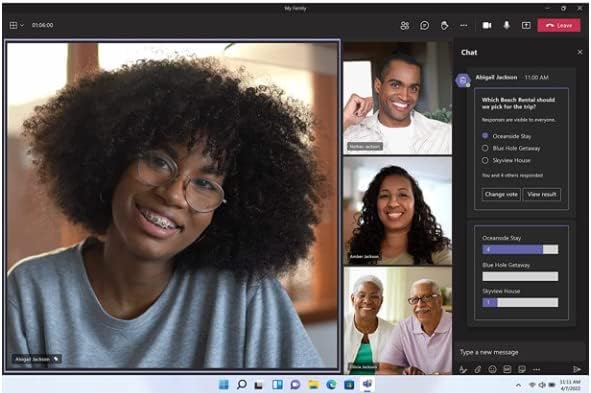
We’ve reimagined every element of the Windows 11 UX to feel effortless, personal, and focused.

Consegna
veloce

Reso
gratuito*

Imballaggio sicuro

Prodotti originali al 100%

Conformità PCI DSS

Certificazione ISO 27001



Note: Step Down Voltage Transformer required for using electronics products of Stati Uniti store (110-120). Recommended power converters Acquista ora.


Cosa salta all'occhio
New System Compatibility
Designed specifically for new PC builds, ensuring seamless installation and optimal performance on the latest hardware configurations that enhance user experience.
Genuine Microsoft Branding
Officially branded by Microsoft, guaranteeing authenticity and access to the latest updates, security features, and robust support that users trust and rely on.
User-Friendly Installation
Simplifies the setup process for novice users with guided installation, making it easy to configure their new systems without technical complications, bridging the gap for all skill levels.
Dettagli del prodotto
| Product Dimensions | 7.5 x 5.5 x 0.1 inches (19.1 x 14 x 0.3 cm); 1.6 ounces (45.36 grams) |
| Item model number | KW9-00633 |
| Date First Available | December 2, 2021 |
| Manufacturer | Microsoft |
A chi è consigliato?

-
New PC Builders
Ideal for individuals assembling a new computer, providing a reliable operating system for smooth performance.
-
Home Users
Perfect for everyday users who need an intuitive and user-friendly interface for personal tasks and entertainment.
-
Developers
Beneficial for developers setting up workstations, offering modern features and support for the latest application development.

-
Casual Users
May not suit individuals who require minimal or no customization and prefer operating systems pre-installed on machines.
DESCRIZIONE DEL PRODOTTO
Hai qualche domanda? chatta con noi
Domande e risposte dei clienti
-
Domanda:
What is Microsoft System Builder and how does it relate to Windows 11 Home?
Risposta: Microsoft System Builder refers to a version of Windows 11 Home specifically designed for OEMs and system builders. It allows users to install a fresh copy of Windows 11 on new PCs that they assemble or upgrade. This edition ensures that those building custom systems can operate with the latest features and enhanced security that Windows 11 offers. It's perfect for tech enthusiasts who want to create a tailored computing experience or for businesses setting up new workstations. -
Domanda:
Can I install Microsoft Windows 11 Home on hardware that I build myself?
Risposta: Yes, you can install Microsoft Windows 11 Home on self-built hardware. This version is specifically aimed at new system installations, making it an ideal option for custom PC builds. When creating your system, ensure your components meet the minimum system requirements for Windows 11, which includes specific CPU, RAM, and storage specifications. Many enthusiasts and gamers choose this version to enjoy optimal performance and the latest technology advancements. -
Domanda:
What are the key features of Windows 11 Home?
Risposta: Windows 11 Home offers several key features, including a revamped Start Menu, enhanced touch controls, and improved gaming capabilities with DirectStorage. Additionally, it supports virtual desktops and includes integrated Microsoft Teams for seamless communication. These features cater to a diverse range of users, from casual home users to gamers looking for optimized performance. The redesigned interface enhances user experience by providing a more intuitive interaction with the operating system. -
Domanda:
Is Microsoft System Builder Windows 11 Home suitable for gaming?
Risposta: Absolutely, Microsoft System Builder Windows 11 Home is highly suitable for gaming. It includes features like DirectStorage, which reduces load times by allowing games to load assets directly from the SSD, enhancing performance. Moreover, the operating system supports gaming tools such as Xbox Game Pass, providing access to a vast library of games. This makes it a great choice for gamers who want to ensure their new systems can handle the latest titles and heavy graphics demands. -
Domanda:
What are the system requirements for installing Windows 11 Home?
Risposta: To install Windows 11 Home, your system must meet specific requirements: a compatible 64-bit processor, 4 GB RAM, 64 GB storage, DirectX 12 compatible graphics, and support for TPM version 2.0. Additionally, a display of at least 720p resolution is necessary. Meeting these requirements ensures that Windows 11 runs efficiently, allowing users to take full advantage of its capabilities and optimizations, whether for casual use, productivity, or gaming. -
Domanda:
How does the installation process for System Builder Windows 11 Home work?
Risposta: Installing System Builder Windows 11 Home involves creating a bootable USB drive with the Windows installation media, which you can download from the Microsoft website. Once the bootable USB is ready, insert it into your new PC and boot from it. Follow the on-screen prompts to install the operating system. This process allows you to customize installation settings and partition your drives as needed. It's important for system builders to have a clear plan for their setup before beginning the installation. -
Domanda:
Do I need a Microsoft account to use Windows 11 Home?
Risposta: While you can set up Windows 11 Home with a local account, a Microsoft account provides additional features and benefits. With a Microsoft account, you can access services like OneDrive, sync your settings across devices, and download apps from the Microsoft Store. This is particularly beneficial for users who use multiple devices, as it allows for a seamless integration and access to various cloud services, enhancing productivity and user experience. -
Domanda:
Can I upgrade from Windows 10 to Windows 11 Home using System Builder?
Risposta: Yes, users can upgrade from Windows 10 to Windows 11 Home using the System Builder version as long as their hardware supports the upgrade. The installation process will guide you through backing up your current data and settings, while ensuring your system meets Windows 11's requirements. This upgrade is ideal for those looking to take advantage of Windows 11's enhanced performance and user experience without needing to start fresh on a new system. -
Domanda:
What support options are available for System Builder Windows 11 Home?
Risposta: Support for System Builder Windows 11 Home primarily comes from community forums, Microsoft's documentation, and tech enthusiast communities rather than direct customer support. Users can find a wealth of information on troubleshooting, installation guides, and performance optimization online. This setup is common among PC builders who often troubleshoot and share solutions with each other, leading to a collaborative problem-solving environment that enhances user knowledge. -
Domanda:
Where can I buy Microsoft System Builder Windows 11 Home?
Risposta: You can purchase Microsoft System Builder Windows 11 Home from Ubuy in San Marino. Ubuy offers a straightforward shopping experience with a secure platform, ensuring you acquire the official Microsoft software required for new PC installations. This option provides system builders and tech enthusiasts with a reliable source to get the latest Windows operating system for their custom programs, helping you to set up your system efficiently.
Microsoft Operating Systems KW9-00633 Editorial Review
Microsoft System Builder | Windows 11 Home | Intended use for new systems | Install on a new PC | Branded by Microsoft. This operating system is tailored for users building new PCs and is praised for its performance, ensuring a clean installation without bloatware. Some users have mentioned experiencing issues with the GameBar software that significantly affects gaming performance, but overall, many appreciate the seamless integration and stability that Windows 11 offers during everyday tasks. The critical note is that this version is limited to new systems, so compatibility checks are essential before installation, adding a level of security that many find reassuring.
Recensioni e valutazioni dei clienti
2609 valutazioni dei clienti
-
5 stella
69%
-
4 stella
9%
-
3 stella
6%
-
2 stella
2%
-
1 stella
14%
Recensisci questo prodotto
Condividi le tue impressioni con altri clienti
Vantaggi
- Seamless installation on new systems
- No bloatware or additional software
- Robust performance for resource-intensive tasks
- High stability during daily use
- Compatible with advanced security requirements
Contro
- Compatibility checks are essential before installation
Affidabilità della piattaforma e fiducia degli acquirenti

JK
Jasmin
Acquirente verificato
“Great products and very good service: very easy and very fast international delivery.”
9 September 2026 · via Trustpilot
AG
Anke
Acquirente verificato
“Wonderful online shopping experience, smooth transaction from the start. Payment method works conveniently and delivery is unexpectedly fast and reliable. You go the extra mile for service. What makes this even more amazing, you deliver to Namibia. I will remain a happy Ubuy customer and will increase my purchases for sure! Thank you!”
10 September 2026 · via Trustpilot
H
Hazel
Acquirente verificato
“Very easy to find the products what you need, and so fast delivery, that’s why I highly recommended to others costumers to used ubuy.”
10 September 2026 · via Trustpilot
O
Opaleye
Acquirente verificato
“I received exactly what I ordered I was skeptical about your site because that was my first time to order. But the order came timely and neatly packaged. I was not disappointed. Thank you.”
11 September 2026 · via Trustpilot
AC
Adele
Acquirente verificato
“Easy to find and order what you want on the website. Delivery is quick to the UK”
8 September 2026 · via Trustpilot
Pagamento sicuro
Consegna in tutto il mondo
Resi facili
Prodotti originali
Cronologia dei prezzi del prodotto
Informazioni importanti
- Limitazioni: per i prodotti spediti a livello internazionale, si prega di notare che ogni garanzia del produttore potrebbe non essere valida, le opzioni di assistenza del produttore potrebbero non essere disponibili, i manuali del prodotto, le istruzioni e gli avvisi di sicurezza potrebbero non essere nella lingua del paese di destinazione. I prodotti (e i materiali di accompagnamento) potrebbero non essere progettati in conformità con gli standard, le specifiche e i requisiti di etichettatura del paese di destinazione e i prodotti potrebbero non essere conformi alla tensione di rete del paese di destinazione e ad altri standard elettrici (richiedendo l'uso di un adattatore o di un trasformatore, se necessario). Il destinatario è responsabile di assicurare che il prodotto possa essere legalmente importato nel paese di destinazione. Quando si ordina da Ubuy o dai suoi affiliati, il destinatario è l'importatore registrato ed è tenuto a rispettare tutte le leggi e i regolamenti del paese di destinazione.
- Non tutti i prodotti elencati su Ubuy sono in vendita, poiché Ubuy è un motore di ricerca globale. I prodotti sono soggetti a regolamenti di esportazione/commercio.
€ 140
Ordina subito e ricevilo entro Sunday, Settembre 27
Questo articolo non è vietato nel mio Paese. (Se l'articolo non è vietato nel tuo Paese, fai clic sul link: il nostro team verificherà l'autorizzazione.)
Qtà:
Transazione sicura
Conforme allo standard PCI DSS e certificato ISO 27001:2022, con pagamenti crittografati e piena protezione dell'acquirente su ogni ordine.
I nostri principali partner logistici
Consegna transfrontaliera più rapida
Caratteristiche e benefici
- Streamlined and intuitive UI
- Intelligent desktop
- Personalized and accessible
- App compatibility guaranteed
- Flexible upgrade options
- Zero Trust-ready OS for maximum security
Garanzia Ubuy
Vivi un'esperienza di shopping senza pensieri con prodotti 100% originali, sicurezza dei pagamenti conforme allo standard PCI DSS, protezione dei dati certificata ISO 27001, la consegna internazionale più rapida, resi gratuiti, e imballaggio sicuro su ogni ordine.*