- Pagina iniziale /
- Elettronica /
- Home Audio /
- Accessori audio per la casa /
- Distribution /
- Selector Switch Boxes /
- Blackmagic Design DaVinci Resolve Software 00...
0 ratings






Articolo #:
3347703
Blackmagic Design DaVinci Resolve Software 000870 Video Editing Software
83% degli intervistati lo consiglierebbe a un amico
Articolo #:
3347703
€ 498
Dettagli del prezzo
Escluse spese di spedizione e doganali ( Le spese di spedizione e doganali saranno calcolate al momento del pagamento )
*Tutti gli articoli verranno importati da Stati Uniti
0 ratings
Scrivi una recensione
Disponibile
 Importato dal negozio USA
Qtà:
Solo 1 articolo rimasto in magazzino.
Ordina subito e ricevilo entro Monday, Ottobre 19
Transazione sicura
Ubuy works hard to protect your security and privacy. Our advanced payment security system ensures confidentiality by encrypting your information during transmission using AES (Advanced Encryption Standards) and SSL (Secure Socket Layer) protocols. Your payment details are 100% secure as we do not share your payment details with third party sellers.
I nostri principali partner logistici


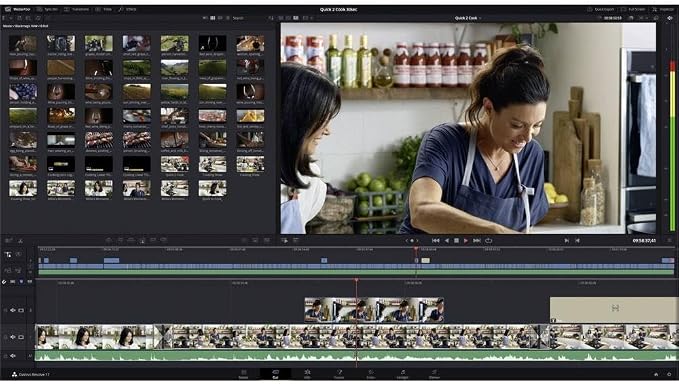
DaVinci Resolve 12 has over 70 new editing features based on feedback from professional editors.

Consegna
veloce

Reso
gratuito*

Imballaggio sicuro

Prodotti originali al 100%

Conformità PCI DSS

Certificazione ISO 27001



Note: Step Down Voltage Transformer required for using electronics products of Stati Uniti store (110-120). Recommended power converters Acquista ora.


Cosa salta all'occhio
Comprehensive Tools
DaVinci Resolve offers a full suite of professional video editing tools, including color correction, visual effects, and audio post-production, making it a one-stop solution for filmmakers and content creators.
Real-Time Collaboration
This software allows multiple users to collaborate on projects simultaneously in real-time, improving productivity and streamlining the creative process for teams working on large-scale productions.
Free Version Available
With a powerful free version, DaVinci Resolve enables budding filmmakers access to advanced editing features without upfront costs, making it an excellent choice for newcomers and budget-conscious professionals.
Dettagli del prodotto
- Compatible with DaVinci Resolve Studio 16 and Upcoming Versions
- Integrates Fusion VFX and Fairlight Audio
- Supports 8K Editing and Color Correction
- Compatible with Mac, Windows, and Linux
- Ships with USB Dongle for License Key
- Features dual monitor support and customizable keyboard shortcuts for faster editing, context sensitive trimming tools, and dedicated trim interface in the viewer for frame accurate cuts
| Product Dimensions | 7.5 x 5.4 x 0.8 inches (19.1 x 13.7 x 2 cm); 2.4 ounces (68.04 grams) |
| Item model number | 870 |
| Date First Available | August 6, 2012 |
| Manufacturer | Blackmagic Design |
A chi è consigliato?

-
Professional Videographers
Ideal for professionals needing advanced editing tools, color correction, and audio mastering capabilities in one comprehensive software package.
-
Content Creators
Perfect for YouTubers and social media influencers seeking intuitive editing tools to enhance their video content with ease.
-
Students in Film
An excellent choice for film students learning video editing and production, offering industry-standard features at no cost.

-
Casual Users
Not suitable for those seeking simple, quick edits without advanced features or extensive learning curves associated with professional software.
DESCRIZIONE DEL PRODOTTO
Hai qualche domanda? chatta con noi
Domande e risposte dei clienti
-
Domanda:
Come acquistare Blackmagic Design DaVinci Resolve Software 000870 online da Ubuy?
Risposta: È facile acquistare Blackmagic Design DaVinci Resolve Software 000870 online da Ubuy.. Devi solo cercare il prodotto, scegliere il metodo di spedizione durante il check-out e farlo consegnare alla tua posizione. -
Domanda:
Blackmagic Design DaVinci Resolve Software 000870 è disponibile per gli acquisti online in San Marino?
Risposta: Sì, su Ubuy San Marino questo prodotto è disponibile per gli acquisti a un prezzo ragionevole.. Il Blackmagic Design DaVinci Resolve Software 000870 non è disponibile localmente ma puoi fidarti di noi con i nostri servizi di spedizione espressa. -
Domanda:
Quanto tempo ci vuole per ottenere il prodotto dopo aver effettuato l'ordine?
Risposta: I tempi di consegna del prodotto ordinato variano in base a ciò che hai ordinato e al metodo di spedizione che hai scelto.. Il tempo di consegna stimato viene menzionato durante il processo di pagamento, quindi sii spensierato durante lo shopping.
Blackmagic Design Selector Switch Boxes 870 Editorial Review
This is a review of Blackmagic Design's DaVinci Resolve 16 Studio software. According to customer feedback, it's a solid, pro-grade software that offers seamless integration between modules (EDIT, Fusion, and Fairlight). With a bit of a learning curve, it quickly becomes a go-to post-production tool with many creative graphics capabilities. The database architecture is flexible, allowing for great file management. The free version is complete, but the Studio version offers more advanced features, including stereoscopic and 4K DCI support, speed effects add-ons (though that's not bundled anymore), and 8K video export. Customers report having issues with the dongle that comes with the software, as it takes up a USB port and could be lost. Overall, if you have the workstation horsepower and enough RAM, DaVinci Resolve 16 Studio offers great value for its price.
Recensioni e valutazioni dei clienti
180 valutazioni dei clienti
-
5 stella
46%
-
4 stella
11%
-
3 stella
10%
-
2 stella
23%
-
1 stella
10%
Recensisci questo prodotto
Condividi le tue impressioni con altri clienti
Vantaggi
- Pro-grade software with seamless module integration
- Flexible database architecture for excellent file management
- Studio version offers advanced features, including 8K video export
Contro
- Dongle takes up USB port and could be lost
Cronologia dei prezzi del prodotto
Informazioni importanti
- Limitazioni: per i prodotti spediti a livello internazionale, si prega di notare che ogni garanzia del produttore potrebbe non essere valida, le opzioni di assistenza del produttore potrebbero non essere disponibili, i manuali del prodotto, le istruzioni e gli avvisi di sicurezza potrebbero non essere nella lingua del paese di destinazione. I prodotti (e i materiali di accompagnamento) potrebbero non essere progettati in conformità con gli standard, le specifiche e i requisiti di etichettatura del paese di destinazione e i prodotti potrebbero non essere conformi alla tensione di rete del paese di destinazione e ad altri standard elettrici (richiedendo l'uso di un adattatore o di un trasformatore, se necessario). Il destinatario è responsabile di assicurare che il prodotto possa essere legalmente importato nel paese di destinazione. Quando si ordina da Ubuy o dai suoi affiliati, il destinatario è l'importatore registrato ed è tenuto a rispettare tutte le leggi e i regolamenti del paese di destinazione.
- Non tutti i prodotti elencati su Ubuy sono in vendita, poiché Ubuy è un motore di ricerca globale. I prodotti sono soggetti a regolamenti di esportazione/commercio.
€ 498
Ordina subito e ricevilo entro Monday, Ottobre 19
Questo articolo non è vietato nel mio Paese. (Se l'articolo non è vietato nel tuo Paese, fai clic sul link: il nostro team verificherà l'autorizzazione.)
Qtà:
Solo 1 articolo rimasto in magazzino.
Transazione sicura
Conforme allo standard PCI DSS e certificato ISO 27001:2022, con pagamenti crittografati e piena protezione dell'acquirente su ogni ordine.
I nostri principali partner logistici
Consegna transfrontaliera più rapida
Caratteristiche e benefici
- Dual monitor support and familiar professional tools for faster editing
- Automatic context-sensitive trimming tools make editing super fast
- Compatible with Resolve Studio 16 and Future Versions, Fusion VFX and Fairlight Audio
- 8K Editing and Color Correction
- Mac, Windows, and Linux Compatible
- Ships with USB Dongle
Garanzia Ubuy
Vivi un'esperienza di shopping senza pensieri con prodotti 100% originali, sicurezza dei pagamenti conforme allo standard PCI DSS, protezione dei dati certificata ISO 27001, la consegna internazionale più rapida, resi gratuiti, e imballaggio sicuro su ogni ordine.*